Posts

HULC LED PROCESS - 3750 High CPU

Image
If you're looking at a switch and you see the HULC LED Process running high. The HULC LED process does some of the following tasks: 1. Check link status on every port 2. If the switch supports POE, it checks to see if there is a power device 3. Transceiver checks 4. Fan status updates 5. Set LED ports 6. Check on temperature status Overall the HULC LED Process is a monitoring process running. During looking into this I turned off all non-used ports since it checks the link status. Then I made sure the environment was good. Two Cisco Bugs: http://tools.cisco.com/Support/BugToolKit/search/getBugDetails.do?method=fetchBugDetails&bugId=CSCsi78581 http://tools.cisco.com/Support/BugToolKit/search/getBugDetails.do?method=fetchBugDetails&bugId=CSCtn42790

Call forward - Busy tone - 7960 phone

So as it appears another issue with call forwards : Scenario : 7960 phone not correctly forwarding calls even though the call forward all was set correctly. Looking into the Forward no answer timers and the service parameters there wasn't anything unusual from the basic scenario. So I took a look at Cisco's general problems that come up with a 7960 and found the link below: http://www.cisco.com/en/US/products/sw/voicesw/ps556/products_tech_note09186a00809b3b06.shtml If we take a look at the solution its asking us to do the following : In order to resolve this problem, complete these steps to reset the  MaxForwardsToDn  counter: Go off hook on the phonethat has the high counter and register it to CCM: Enter  **##*30  from the dialpad in order to enable the phone to accept the code. Go off hook again on the same Cisco IP phone, and enter  **##*35  from the dialpad in order to clear the  MaxForwardsToDn counters. Complete calls to the...

Extension Mobility Login Unavailable (22)

Image
" Extension Mobility Login Unavailable (22) " When configuring extension mobility for a Call Manager environment. Generally when getting the above error you need to enable EM under the actual device.

Change ASDM for ASA 5510

Image
So I got a quick case to just update the ASDM on an ASA Firewall. This one is pretty simple and can be done multiple ways through cli, current asdm, or a mix of both. I'll just do a mix of both. The ASDM upgrade is from version 631 to 713. *** Before you start make sure you download the newest ASDM version that is compatible with your ASA version. show version  1. Login to ASDM 2. Go to Tools > File Management  3. Transfer the file from the local PC to the Disk0 in the ASA 4. Go to CLI to remove / verify  the OLD asdm image  sh run asdm asdm image disk0:/asdm-631.bin no asdm image disk0:/asdm-631.bin 5. Make the new image the ASDM image asdm image disk0:/asdm-713.bin 6. Verify changes

T1 VWIC3 not coming up - 15.0 IOS

So I'm working on a T1 for a PRI circuit. Low and behold the t1 doesn't want to come up. A couple of the tests that I did were: 1. Loop-back test 2. T1 Card / Configuration reset 3. Telephone vendor switch their Meta Switch Throughout testing we were not able to get the T1 to stay up. It would come up and then go down. Come up and then go down. T1 OUTPUT:  ISDN Se0/1/0:23 Q921: User RX <- RRp sapi=0 tei=0 nr=0  ISDN Se0/1/0:23 Q921: User TX -> RRf sapi=0 tei=0 nr=0 ISDN Se0/1/0:23 Q921: User RX <- RRp sapi=0 tei=0 nr=0 ISDN Se0/1/0:23 Q921: User TX -> RRf sapi=0 tei=0 nr=0 %CONTROLLER-5-UPDOWN: Controller T1 0/1/0, changed state to down (LOF detected)  ISDN Se0/1/0:23 Q931: L3_ShutDown: Shutting down ISDN Layer 3  ISDN Se0/1/0:23 Q931: Ux_DLRelInd: DL_REL_IND received from L2  %MARS_NETCLK-3-HOLDOVER: Entering Holdover for Controller T1 0/1/0 %LINK-3-UPDOWN: Interface Serial0/1/0:23, changed state to down  %MARS_NETCLK-3-HOLDOVER_...

Base Configuration Netflow and Flexible Netflow Template Version 9

BASE Flexible Netflow Template (3750 w/ module) ----------------------------------        flow record RECORD1 match ipv4 source address match ipv4 destination address collect counter bytes long collect packets long flow exporter EXPORT1 destination <IPADDRESS> transport udp <PORT#> flow monitor MONITOR1 record RECORD1 exporter EXPORT1 BASE Netflow Template (Router) ------------------------------------ ip flow-export source < Interface > ip flow-export version 9 ip flow-export destination <IP Address>  <Port Number>   ip flow-cache timeout active <Time in Minutes>

Error: Contact Administrator - CUCM Corporate Directory

Image
Error: Contact Administrator The above error may come up when using the "Directory" button on your Cisco Phone. This can be resolved a couple ways.  One is to try configuring the Corporate Directory Service from the previous DNS identifier: Change to :   http://x.x.x.x:8080/ccmcip/xmldirectory.jsp   X.X.X.X = IP Address of CUCM Publisher Server  Make sure you "SAVE" the IP Phone Services Configuration Another method is to make a service with the same "http" field above and name it Corp Directory and subscribe it to the enterprise. 

%PLATFORM_UCAST-4-PREFIX: --------- TCAM 3750 Switch

Image
 %PLATFORM_UCAST-4-PREFIX:  One or more, more specific prefixes could not be programmed into TCAM and are being covered by a less specific prefix, and the packets may be software forwarded So what is TCAM ? Ternary Content Addressable Memory is used in multi-layer switching also know as Layer 3 switching. The switches forward the packets and frames at the speed of the line by using ASIC hardware. Normally switches make there forwarding decisions based on Layer 2. TCAM is used for Layer 3 components and other features such as QOS and ACES ( Access List ).  Check TCAM and usage of templates being used in the device.  show sdm prefer ? ! This will show us the templates that can be used in the device to give more resources to one feature or the other. For example the default is the equal resource distribution while the routing gives more resources to Layer 3 routing. show sdm prefer ! The command without the "?" will show us what we are cu...

Configuration Fractional T1 PRI

Below is a configuration for a T1 PRI that has both voice and data running across the circuit. This was tested in a lab environment. ! Global configuration isdn switch-type primary-ni ! This is the primary configuration for switch type for United States card type t1 0 0  ! This configuration sets the card type of the installed called. "0' and "0"  OR "zero" and "zero" represent the card information of the slot and sub slot. You can get this information by doing a show inventory or show diag. show inv NAME: "CISCO2901/K9 chassis", DESCR: "CISCO2901/K9 chassis" PID: CISCO2901/K9      , VID: V06 , SN: NAME: "VWIC3-2MFT-T1/E1 - 2-Port RJ-48 Multiflex Trunk - T1/E1 on Slot 0 SubSlot 0 ", DESCR: "VWIC3-2MFT-T1/E1 - 2-Port RJ-48 Multiflex Trunk - T1/E1" PID: VWIC3-2MFT-T1/E1  , VID: V01 , SN:  controller T1 0/0/1 cablelength short 110 channel-group 11 timeslots 11-20 ! ...

UCCX and CUCM 9.0 Integration Steps ( Pre check)

Login to CUCM Serviceability Go to Service Activation Turn on AXL Web Service Go to CUCM Unified CM Admin Page : Create ACG  Create an Access Control Group Usesr Management > User Settings > Access Control Group Assign roles to the group using the "Related Links" drop down in the upper right hand corner Assign Standard AXL API Access Create an Application User User Management > Application User Create user for AXL Access  Assign Role to user for Access Control Group made Create user for AXL Access Save user Create End User Create End User that will be used for the admin account Have license file ready  Once done begin the steps for the setup wizard on the CCX administration page 

Quick IP Address Subnetting a /24

Had a client that needed a range of IP's specifically 8.  The only trouble was getting a block that would suffice out of the /24 and distribute it into chunks. If you're handy with math and understand CIDR / Subnetting this is an easy way to get your numbers quickly. Lets say our range is 1.1.1.0/24  and we need a total of 8 ip's ( 6 usable ). What is the subnet mask going to be? Well there are 256 TOTAL numbers of bits on or off in an octect (X.X.X.X each x represents an octet) to make up an actual number. 0 through 255   = 256 total because we count 0 So simple math: I need 8 right ? 256 -  8 = 248 Subnet mask = 255.255.255. 248 Now we just need to find a block or range.  Lets say we want to have 200 as a range. If you just take that number (200 for example) and divide by 8 you will see if it goes into it evenly or not. If it does this is the starting network address. For example = 200 /  8= 25 EVENLY     ...

IPS Module Sync NTP Server Error

Image
So working on an IPS module. I finally got it up and running with a reload and install of an upgrade package. However the NTP server would not sync even though it was configured correctly! When adding an IPS module to the IPS Manager Express you may come across the following error.  In order to fix this we need to re-associate the time clock and make sure that the local host and the IPS are actually in sync. What to check: 1. Check NTP Configuration  IPS# sh clock - Check clock to make sure it is in sync or not with the actual NTP Server / ASA host 14:44:29 GMT-06:00 Tue May 28 2013 IPS# sh statistics host - Check the configuration of the host to make sure that it is actually synchronized and associating to the correct NTP source General Statistics    Last Change To Host Config (UTC) = 28-May-2013 18:18:06    Command Control Port Device = Management0/0 Network Statistics     = ma0_0     Link encap:Ethernet ...

Basic Step of SIP Trunk / H323 Gateway

Below is the IOS configuration from my lab for a SIP trunk to the sip provider and h323 gateway configured in Call Manager: **** This is only for incoming calls. Outbound call isn't fully configured. Voicegateway Configuration: ! ! ! ip domain name lab.local ip name-server 8.8.8.8 ! ! voice call send-alert voice rtp send-recv ! voice service voip   allow-connections h323 to h323  allow-connections h323 to sip  allow-connections sip to h323  allow-connections sip to sip  h323  sip   bind control source-interface FastEthernet0/0   bind media source-interface FastEthernet0/0 ! ! ! ! voice class h323 1 ! ! ! ! ! voice translation-rule 1  rule 1 / Inbound PSTN Number / /4200/ ! ! voice translation-profile CALLED  translate called 1 ! ! ! ! ! ! archive  log config   hidekeys ! ! ! ! ! ! interface FastEthernet0/0  description Main Link to Switch  ip address ...

Wireless Radius Authentication - Client can't connect to wireless network.

Image
So the masses are just screaming. They can't connect to the wireless SSID. Gather the client's MAC from their wireless network connection: CMD: (In windows command prompt)  - ip config - scroll to wireless connection To begin its time to debug! CMD : debug client <MAC ID> Example : debug client 11:22:33:44:55:66  After a debug we can see the clients' authentication or errors based on the MAC addressed defined. Below is a debug of the client having issues: Authentication has exceeded its maximum attempts. This leads me to check into the radius server before changing any settings for attempts or timing values ( which can be a problem as well ).  Low and behold the radius server had an expired authentication certificate. 

Reset CUCM ( Call Manager) OS Platform Password

Image
If you forget the OS password and you're trying to access one of the following: - CLI - Cisco Unified OS Administration - Disaster Recovery System You can reset the password if you ssh the to Call Manager node. When you log in the username and password you will use will be : user:   pwrecovery pass: pwreset After we get into the system. Make sure you do the following: 1. Remove all CD / DVD Media from the Server. 2. Insert a valid CD or DVD into the Disk Drive for the CUCM Version / Installation 3. Continue so we get the menu listed above and enter the letter " a " to reset the admin password. When we reset the the password make sure you use non-basic passwords like birthdays, names, or dictionary words. If you use any of the password types CUCM will deny the usage of the password. As above I entered a general password and I was denied using the password due to being a "dictionary word". So I retried and used a special secret...

Configure Failover for ASA 5520 GNS3

Image
The above is a topology in GNS3 that is short and sweet. Two ASA's running 8.4 code and enabling failover.  I will post the configuration I did for failover of ASA's just to test it out. Links:  E1 - Outside Interface |  172.16.1.1 /24  |    E3 -  Failover Interface |  Primary 10.1.1.1 /24 | E3 - Failover Interface | Secondary 10.1.1.2 /24 | E2 - Outside Interface | 172.16.1.2 /24 |  Primary ASA Config: interface GigabitEthernet1  nameif outside  security-level 0  ip address 172.16.1.1 255.255.255.0 interface GigabitEthernet3  description LAN/STATE Failover Interface FAIL OVER CONFIG ---------------------------------------------- - failover failover lan unit primary  failover lan interface failover GigabitEthernet3 failover link failover GigabitEthernet3 failover interface ip failover 10.1.1.1 255.255.255.0 standby 10.1.1.2 Secondary ASA Config: ...

Cisco Tomcat High CPU Utilization 99 percent

Image
So a client was experience slow web interface usage to their calling node. As well RTMT was shooting off the alert. The alert is for Call Process CPU Node Pegging.  The culprit tomcat! Cisco Tomcat Service -  In enterprise edition this is a web server service. In the business edition (BE Servers) this uses the web server and unity utilizes the service as well. Log in to each call manager node and issue the following command: show process load cpu **OUTPUT** top - 08:55:48 up 340 days, 4:03, 1 user, load average: 4.64, 3.25, 2.98  Tasks: 142 total, 2 running, 140 sleeping, 0 stopped, 0 zombie  Cpu(s): 16.3%us, 3.4%sy, 0.0%ni, 80.1%id, 0.1%wa, 0.0%hi, 0.2%si, 0.0%st  Mem: 4016964k total, 3856400k used, 160564k free, 29904k buffers  Swap: 2064280k total, 1664k used, 2062616k free, 598124k cached  PID USER PR NI VIRT RES SHR S %CPU %MEM TIME+ COMMAND  8065 tomcat 25 0 2317m 1.9g 22m S 99.4 50.4 358084:37 tomcat  1 root 15 ...

Adding Routes to Windows Box ( Static and Persistent Route)

Image
A client calls in and needs to have a route added to their network in order to be able get to the domain of a certain LAN. So in order to add a static route to a windows environment we will do the following: route add  < IP of Destination Network >  < Subnet Mask>  < Gateway> <Metric> For this example my destination will be 192.168.24.1 255.255.255.0 and gateway192.168.24.1 Adding a route via windows cmd prompt Now we can do a "route print" to see the routes on a windows machine: Now we see the route was added. However if we wanted to add this route as a PERSISTENT route  we would need to add the " -p " character in from of our IP's.  Persistent Route: route -p ADD <IP of Destionation Network> <SubnetMask>  <Gateway> <Metric>

CIPT2 Notes

Image
Quality Issues Availability Issues Dailplan Issues Nat and Security Issues Quality Issues Packet by packet delivery No guarantee for correct order RTP fills in gaps with sequence numbers Bandwidth shared by multiple users and applications Peaks and buffer queues Jitter Packet drops in case of buffer congestion ** When queue fills up packets are dropped so QoS needs to be implemented Quality Issues in multisite deployment generally are:  1. Buffer delays and packet drops  2. Bandwidth shared by multiple streams  3. Packets can be delivered out of sequence Bandwidth Issues All inter-site traffic ( voice data video) competing for availability Voice causes lots of overhead No unnecessary traffic should be sent over the IP WAN Voice Packet : Small size High Packet Rate Large Overhead Data Packet : Large Size Lower Packet Rate Small Overhead Availability Issues  - Signa...

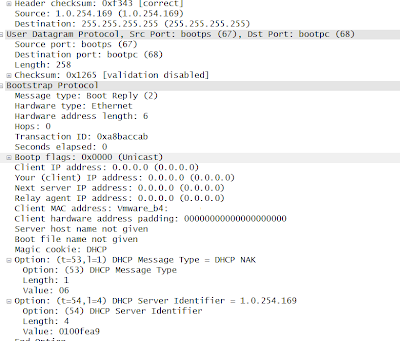
DHCP Reservation is slow / not working completely. ( 1.0.254.169 IP )

Image
One problem i found is the address 1.0.254.169 is an IP address that can cause many errors when trying to do DHCP reservations especially if you are within the same broadcast domain. 1.0.254.169 is the virtual DHCP server IP address of a tool called Himachi made by LogMeIn. When a computer was trying to lease an ip address it would either get 0.0.0.0 or no IP at all with "access denied". So to Wireshark we turn ! A live capture was done on one of the devices being affected by the issue. In the capture it was found the broadcast was sent out for DHCP through the correct gateways but the unicast response was sent back from 1.0.254.169. This virtual IP that responded was a Himachi LogMeIn machine that was running in the same VLAN with promiscuous mode turned on the NIC.  In order to fix this we turned off the Himachi Gateway and now we no longer are having the weird lease / reservation issues.