The purpose of this blog is just to post some general info in regards to networking and a couple items that I might come across or be studying for.
Extension Mobility Login Unavailable (22)
Get link
Facebook
X
Pinterest
Email
Other Apps
" Extension Mobility Login Unavailable (22) "
When configuring extension mobility for a Call Manager environment. Generally when getting the above error you need to enable EM under the actual device.
Reserve My HSRP went above and above! My HSRP experience was stress-free because to the quick service and simple online booking. Many thanks Book my hsrp
If you're looking at a switch and you see the HULC LED Process running high. The HULC LED process does some of the following tasks: 1. Check link status on every port 2. If the switch supports POE, it checks to see if there is a power device 3. Transceiver checks 4. Fan status updates 5. Set LED ports 6. Check on temperature status Overall the HULC LED Process is a monitoring process running. During looking into this I turned off all non-used ports since it checks the link status. Then I made sure the environment was good. Two Cisco Bugs: http://tools.cisco.com/Support/BugToolKit/search/getBugDetails.do?method=fetchBugDetails&bugId=CSCsi78581 http://tools.cisco.com/Support/BugToolKit/search/getBugDetails.do?method=fetchBugDetails&bugId=CSCtn42790
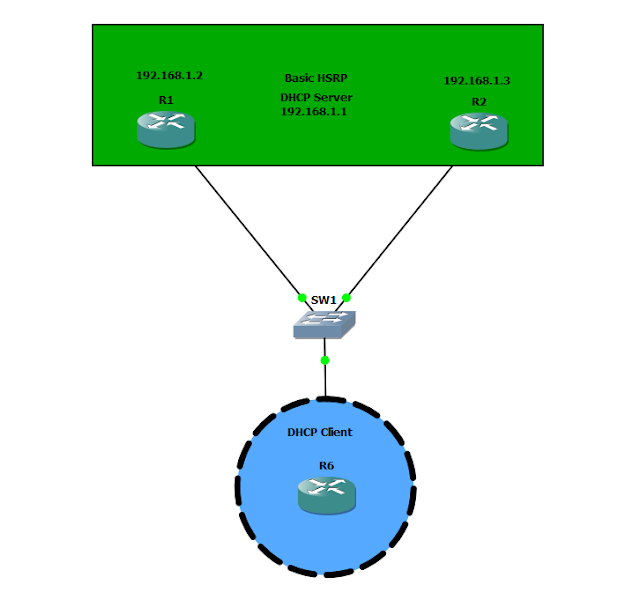
In this scenario below what we have configured is Hot Standby Routing Protocol ( HSRP) with DHCP HSRP is configured for redundancy so if one link goes down we have a transparent recovery and that pretty is much immediate. When we use a default gateway it will be the gateway of 192.168.1.1 ( This is the virtual IP address of both routers and the gateway for all end users. In this configuration we use a router for a "host" simulation and place the port on R6 to initiate a dhcp request. Configuration : DHCP POOL CONFIGURED ON BOTH R1 and R2 ip dhcp excluded-address 192.168.1.1 192.168.1.5 ( Exclude the IP's that we do not want allocated out ) ip dhcp pool DATA network 192.168.1.0 255.255.255.0 (Define the network scope we want to give out ) default-router 192.168.1.1 ( The default router is the virtual IP that we setup for HSRP ) R1: interface FastEthernet0/0 ip address 192.168.1.2 255.255.255.0 duplex a...


Thanks
ReplyDeleteThanks
ReplyDeletenice
ReplyDeleteThanks! I should have known that.
ReplyDeleteThanks! I should have known that.
ReplyDeleteMany Thanks..!!
ReplyDeleteThanks
ReplyDeleteThank you very much!
ReplyDeletethanks
ReplyDeletethanks man.
ReplyDeleteOne little checkbox lol, Thanks
ReplyDeleteHSRP booking that is super speedy and dependable!
ReplyDeleteBook my hsrp
Reserve My HSRP went above and above! My HSRP experience was stress-free because to the quick service and simple online booking. Many thanks
ReplyDeleteBook my hsrp